
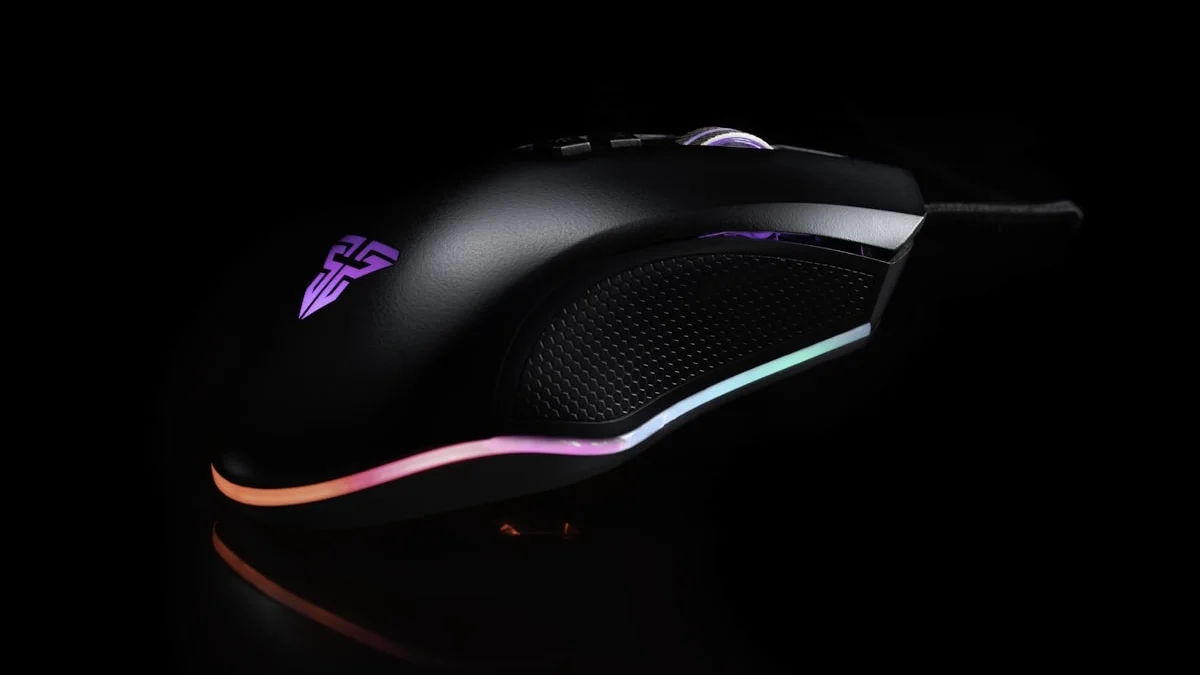
It’s easy to get pulled into spec sheets when shopping for a gaming mouse, chasing the highest DPI number or the lowest advertised weight without stopping to ask whether any of it actually matters for how you play. The truth is that most modern gaming mice, even midrange ones, use sensors that are more than accurate enough for anyone outside of the very top competitive tier. What actually separates a mouse that feels great from one that feels wrong in your hand comes down to shape, weight, grip compatibility, and how its buttons are laid out for the genre you play most. Getting those right matters far more than an extra ten thousand DPI you’ll never use.
Sensor Quality and DPI: Less Complicated Than It Sounds
DPI, or dots per inch, measures how far your cursor moves on screen relative to how far you physically move the mouse. Manufacturers love to advertise huge DPI numbers, sometimes well past 30,000, but in practice almost every player games somewhere between 400 and 3,200 DPI, adjusted alongside in-game sensitivity to get a comfortable turn speed. A sky-high maximum DPI is mostly irrelevant unless you’re using an unusually high resolution monitor at native scaling; what actually matters is sensor consistency, meaning the mouse tracks your movement accurately without unwanted acceleration, jitter, or skipping, especially during fast flicks. The good news is that sensor quality has become something of a solved problem in 2026. Most mice from established brands, even budget-friendly ones, use optical sensors capable of tracking cleanly well beyond what any human needs. Unless you’re shopping at the very low end from an unknown brand, sensor quality shouldn’t be your deciding factor anymore, freeing you up to focus on the things that genuinely differ from mouse to mouse: shape, weight, and feel.
Weight and Shape Matter More Than the Spec Sheet Suggests
The lightweight mouse trend has fully taken hold, with many competitive-focused models now weighing between 45 and 65 grams thanks to perforated shells or dense internal engineering that doesn’t require cutouts. Lighter mice reduce fatigue during long sessions and make rapid flicks and micro-adjustments feel more effortless, which is why they’ve become the default choice for fast-paced shooters. That said, lighter isn’t automatically better for everyone. Some players genuinely prefer a bit of heft because it adds a sense of control and stability, particularly for slower, more deliberate aiming in games that don’t demand rapid-fire flicking. Shape is arguably even more important than weight, because a mouse that doesn’t match your hand size or grip style will feel wrong no matter how good its internals are. If you can, test a mouse in person before buying, or at minimum check its dimensions against a mouse you already own and like.
Claw, Palm, and Fingertip Grip: Find Yours First
Grip style is one of the most overlooked factors in mouse shopping, and it’s worth figuring out yours before you spend money. Palm grip is the most relaxed and common style, where your whole hand rests on top of the mouse and your fingers lie flat along the buttons; this style generally favors larger, taller mice with a supportive arch that fills the hand. Claw grip involves an arched palm with fingertips bent down to press the buttons almost vertically, offering quicker button response and more precise small movements, and it tends to suit mice with a shorter, flatter profile and a defined front lip near the buttons. Fingertip grip lifts the whole hand off the mouse, controlling it entirely with the fingertips, favored by players who prioritize fast, whippy movements above all else; it generally works best with smaller, lighter mice since there’s no palm support to help push around a heavier shell. Most players actually use a hybrid of two of these styles without realizing it, so rather than trying to force yourself into a category, pay attention to where your hand naturally rests and pick a shape that supports that posture rather than fights it.
Wireless vs Wired in 2026: A Non-Issue for Most Players
This debate has largely been settled. Modern wireless gaming mice using proprietary low-latency 2.4GHz connections, rather than standard Bluetooth, now deliver response times essentially identical to a wired connection, with high polling rates that keep input lag imperceptible even in competitive play. Professional esports players across major shooter titles now compete on wireless mice without any meaningful disadvantage, which tells you most of what you need to know. Battery life has also stopped being a real concern for the vast majority of mid-range and premium mice, with many models lasting well over 50 hours per charge even with RGB lighting active, and quick-charge features that add hours of use from a few minutes plugged in. The main reasons to still choose a wired mouse in 2026 come down to budget, since wired mice remain cheaper for a given level of sensor quality, or personal preference for never having to think about charging. If you do go wireless, just make sure the mouse uses its own USB receiver rather than relying solely on Bluetooth, since Bluetooth’s higher latency is better suited to office work than competitive gaming.
Button Configuration Should Match Your Genre
A mouse built for one genre can feel completely wrong in another, mostly because of how many buttons it offers and where they sit. FPS players generally want a clean, minimal mouse with the standard left and right click, a scroll wheel click, and maybe two thumb buttons for leaning or gadget use, since too many extra buttons under the thumb can lead to accidental presses during fast movements. MMO and MOBA players benefit from the opposite: mice with a dozen or more programmable side buttons, often arranged in a grid under the thumb, let you bind entire ability bars and macros without ever touching the keyboard, which is genuinely transformative for games with large skill rosters. General-purpose and productivity-leaning players tend to do well with something in between, a handful of extra buttons for browser navigation or quick macros without the bulk of a full MMO grid. Before buying, think honestly about which games you spend the most time in, since a mouse optimized for MMO button-mashing will often feel cluttered and imprecise in a fast shooter, and a stripped-down FPS mouse will leave MMO players constantly reaching for the keyboard.
A Few Small Things Worth Checking
Beyond the big three of shape, weight, and connectivity, a couple of smaller details are worth a quick check before you commit. Cable quality matters even on wireless mice, since most still ship with a charging cable that doubles as a wired backup, and a stiff, heavy cord can drag and affect movement if you ever do plug in. Coating and texture matter for anyone who games with sweaty hands, with textured or matte coatings generally holding up better over long sessions than glossy plastic. Finally, check the software situation. A mouse with straightforward, lightweight configuration software is generally preferable to one that forces a bloated background app just to set DPI stages or remap a button, since some of those programs end up consuming more system resources than they’re worth.

[…] Wired Gaming Peripherals Best Gaming Headset 2026: Wireless, Surround Sound & Budget Picks How to Choose a Gaming Mouse That Actually Fits Best Gaming Monitor 2026: 1080p, 1440p & 4K Picks by […]